DAGs & Compilation
This page explains the two halves of how Cursus turns a topology you draw into a runnable SageMaker pipeline:
The DAG model — a lightweight directed acyclic graph (
PipelineDAG) whose nodes are step names and whose edges are dependencies.The compilation pipeline —
PipelineDAGCompilerand theDynamicPipelineTemplate/PipelineAssemblermachinery that resolve each node to a config and a builder, wire the steps together, and emit asagemaker.workflow.pipeline.Pipeline.
The design goal is invariance: the same DAG plus the same config file always compiles to the same pipeline structure, regardless of who calls it or how. You never hand-write a SageMaker step; you declare what steps exist and how they depend on each other, and the compiler figures out the rest.
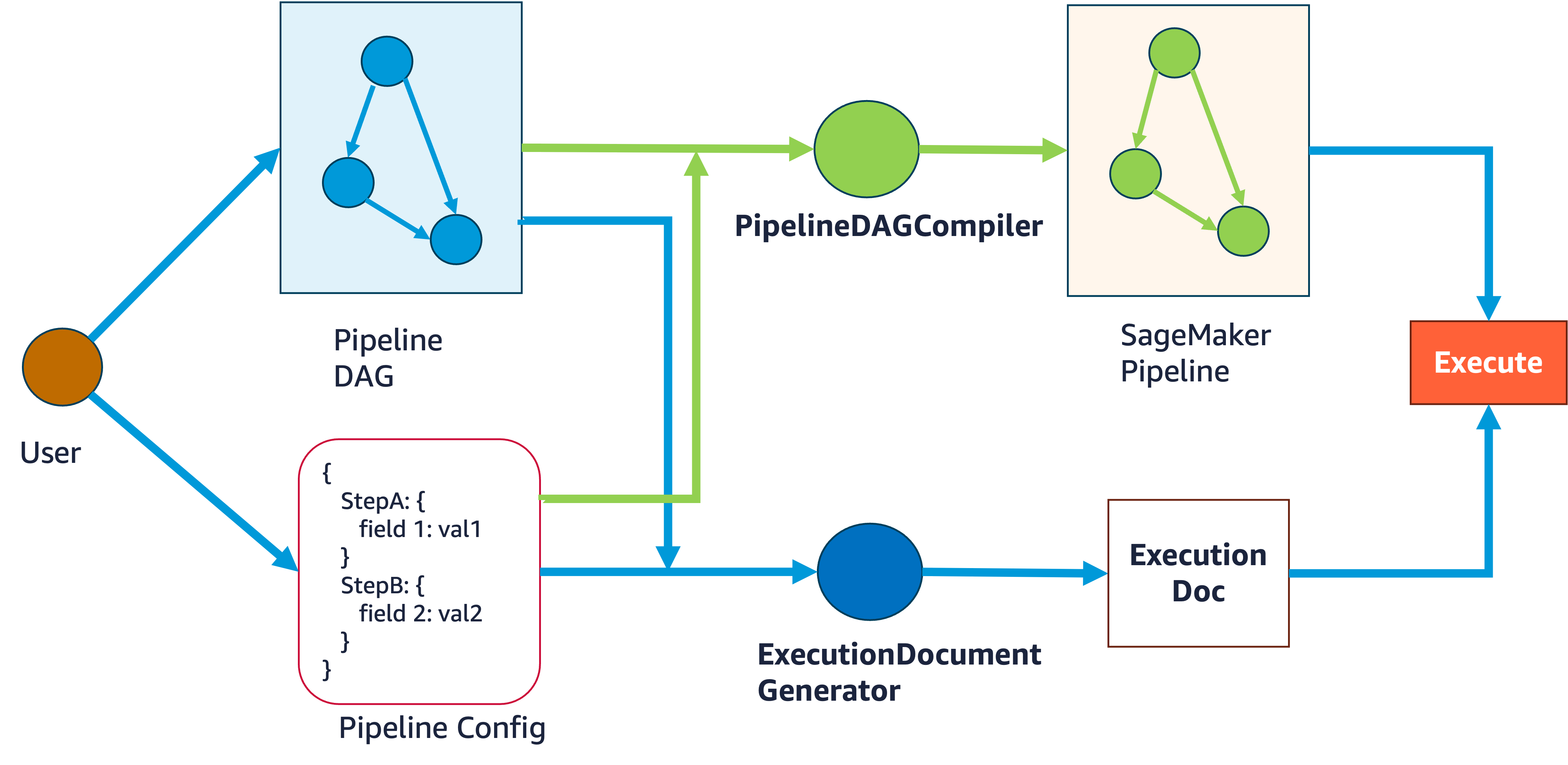
Compilation flow. You supply a Pipeline DAG and a Pipeline Config;
PipelineDAGCompiler compiles them into a SageMaker Pipeline, while the
ExecutionDocument generator turns the same config into an execution document — both
of which feed the final Execute step.
Related reading: Dependency resolution, Step interfaces, Config system, Registry & discovery, and the CLI reference.
The DAG model
PipelineDAG
PipelineDAG (in cursus.api.dag.base_dag) is deliberately minimal. A node is
just a step name (a string); an edge is a (from_step, to_step) tuple meaning
“to_step depends on from_step”. There is no config, no builder, and no
SageMaker object attached at this stage — the DAG is pure topology.
from cursus.api.dag import PipelineDAG

dag = PipelineDAG()
dag.add_node("CradleDataLoading_training")
dag.add_node("TabularPreprocessing_training")
dag.add_node("XGBoostTraining")

dag.add_edge("CradleDataLoading_training", "TabularPreprocessing_training")
dag.add_edge("TabularPreprocessing_training", "XGBoostTraining")
You can also construct a DAG in one shot:
dag = PipelineDAG(
    nodes=["A", "B", "C"],
    edges=[("A", "B"), ("B", "C")],
)
Internally the DAG maintains:
Attribute |
Meaning |
|---|---|
|
ordered list of step names |
|
list of |
|
forward adjacency (node → successors) |
|
reverse adjacency (node → predecessors) |
|
the set of nodes you explicitly declared (see below) |
Useful methods:
get_dependencies(node)— immediate parents (predecessors) of a node.topological_sort()— nodes in a valid execution order; raisesValueError("DAG has cycles or disconnected nodes")if no ordering exists.
Declared vs. auto-created nodes
add_edge is lenient by default: if you reference an endpoint that was never
declared, it auto-creates that node so construction never raises an opaque
KeyError. Convenient — but a single typo silently spawns a phantom, unconfigured
node and orphans the real one. For example:
dag.add_node("TabularPreprocessing_training")
dag.add_edge("CradleDataLoading_training", "TabularPreprocessing_traning")  # typo!
The typo ..._traning becomes a brand-new node with no config behind it. To catch
this, Cursus tracks which nodes were explicitly declared (passed in nodes= or
added via add_node) separately from those auto-created by add_edge.
validate_node_declarations()
Call this to list every edge endpoint that was never explicitly declared. An empty
list means every endpoint is accounted for; any member is a likely typo or a
forgotten add_node. It is non-fatal — it only reports.
undeclared = dag.validate_node_declarations()
if undeclared:
    print(f"Suspicious (undeclared) edge endpoints: {undeclared}")
Strict mode
Pass strict=True to turn the same condition into an immediate ValueError:
add_edge (and the constructor) will refuse any endpoint that was not declared
first. Use this when you want typos to fail loudly at graph-build time rather than
surfacing later during compilation.
dag = PipelineDAG(strict=True)
dag.add_node("A")
dag.add_edge("A", "B")   # ValueError: endpoint 'B' was never declared via add_node
In strict mode you must add_node every node before wiring edges. In lenient mode
(the default), rely on validate_node_declarations() — or the serializer’s
dangling-edge check — to surface problems.
Serialization
PipelineDAG round-trips to/from JSON via cursus.api.dag:
from cursus.api.dag import export_dag_to_json, import_dag_from_json

export_dag_to_json(dag, "my_dag.json")
dag2 = import_dag_from_json("my_dag.json")
The writer (PipelineDAGWriter) validates the DAG before writing (including a
dangling-edge check), and the reader (PipelineDAGReader) validates on load. Every
compiler entry point accepts either a live PipelineDAG or a path to one of
these JSON files.
A note on EnhancedPipelineDAG
Older versions exposed an EnhancedPipelineDAG name in the top-level cursus
package, but there was never a concrete implementation, so it has been removed from
the public surface. Use PipelineDAG for all work; the intelligent, spec-based enhancement it hints
at is provided at compile time by the dependency resolver (see
Dependency resolution), not by a separate DAG class.
What “compile” produces
Compilation takes (DAG, config file) and produces a
sagemaker.workflow.pipeline.Pipeline — the object you can inspect, serialize
with pipeline.definition(), deploy with pipeline.upsert(), or run with
pipeline.start(). Cursus does not wrap or replace the SageMaker SDK; it emits a
native Pipeline whose steps, dependencies, inputs, and outputs have been filled
in for you.
The config file is a JSON document holding one configuration object per step (plus
optional metadata). Each DAG node is matched to a config, each config is matched
to a step builder, and each builder knows how to produce the concrete SageMaker
step (processing, training, etc.). See Config system and
Step interfaces for those layers.
The invariance guarantee
The compiler is deterministic: the same DAG and the same config file always yield
the same pipeline structure — the same steps, the same dependency edges, and the
same input/output wiring. Nothing about who calls compile() or from where
changes the result. This is what makes a serialized DAG + config a reproducible
description of a pipeline, and it is why the CLI, the Python API, and the MCP tools
all funnel through the same compiler.
The compilation pipeline
High-level flow
PipelineDAG ─┐
             ├─► PipelineDAGCompiler.compile() ─► DynamicPipelineTemplate
config.json ─┘                                          │
                                                        ▼
                                          template.generate_pipeline()
                                                        │
                                                        ▼
                                               PipelineAssembler
                                                        │
                                                        ▼
                                        sagemaker.workflow.pipeline.Pipeline
Three cooperating layers:
Layer |
Class / module |
Responsibility |
|---|---|---|
Compiler |
|
Public API; validation, reporting, template creation |
Template |
|
Resolve nodes → configs → builders; drive generation |
Assembler |
|
Instantiate steps, wire dependencies, emit the |
PipelineDAGCompiler
PipelineDAGCompiler is the main entry point when you want control over
validation, previews, and reporting. Construct it once with a config file and
(optionally) a SageMaker session and role:
from cursus.core.compiler import PipelineDAGCompiler

compiler = PipelineDAGCompiler(
    config_path="configs/my_pipeline.json",
    sagemaker_session=session,
    role="arn:aws:iam::123456789012:role/SageMakerRole",
)
The constructor also accepts a project_root / anchor_file (the “caller hook”
for resolving step source directories) and workspace_dirs for external step
packs. See Path resolution and Step packs.
Key methods:
validate_dag_compatibility(dag) -> ValidationResult
Checks that every DAG node has a resolvable config and a resolvable builder,
before you try to build anything. It builds a throwaway template, resolves the
config map and builder map, and runs the ValidationEngine. The returned
ValidationResult (a Pydantic model in core.compiler.validation) carries:
is_validmissing_configs— nodes with no matching configunresolvable_builders— configs with no matching builderconfig_errors— per-node errors, including config-node mismatches (a node name that encodes one step type bound to a config for a different step type) and interface-load failuresdependency_issues,warnings
result = compiler.validate_dag_compatibility(dag)
print(result.summary())          # "✅ Validation passed" / "❌ Validation failed: ..."
if not result.is_valid:
    print(result.detailed_report())
preview_resolution(dag) -> ResolutionPreview
Shows how each node will resolve — the node → config-type map, config → builder-type map, and a confidence score per node. Low-confidence resolutions (< 0.8) generate recommendations (e.g. rename a node to match its config).
preview = compiler.preview_resolution(dag)
print(preview.display())
create_template(dag, **kwargs) -> DynamicPipelineTemplate
Builds the DynamicPipelineTemplate without generating the pipeline, so you can
inspect or tweak it. All the higher-level methods delegate to this. By default it
enables validation (skip_validation=False).
compile(dag, pipeline_name=None) -> Pipeline
The one-call path from DAG to Pipeline. It creates the template, calls
template.generate_pipeline(), and names the result (using your override, or a
rule-based name derived from pipeline_name / pipeline_version on the configs
via generate_pipeline_name). For performance it defaults to skip_validation=True
here — validation is expected to be run separately via
validate_dag_compatibility or compile_with_report — but config resolution
is always strict, so a bad config map is still a hard error, never a silent
partial pipeline.
pipeline = compiler.compile(dag, pipeline_name="my-training-pipeline")
pipeline.upsert()          # deploy to SageMaker
compile_with_report(dag, pipeline_name=None) -> (Pipeline, ConversionReport)
Compiles and returns a detailed report. This is the method to use when you want a paper trail of how nodes resolved.
pipeline, report = compiler.compile_with_report(dag)
print(report.summary())
print(report.detailed_report())
The ConversionReport (in core.compiler.validation) contains:
Field |
Meaning |
|---|---|
|
name of the generated pipeline |
|
list of node/step names |
|
per-node |
|
mean confidence across all nodes |
|
e.g. low-confidence or ambiguous resolutions |
|
node/edge counts, config path, step-catalog stats |
Note: the report class is named
ConversionReport(a “DAG → pipeline conversion” report); there is no separateCompilationReporttype. Single-node compilation exposes its own lightweightExecutionPreviewandValidationResultinstead (see below).
Other helpers
get_supported_step_types()— step types the catalog can build.validate_config_file()— sanity-check that the config file loads.get_last_template()— the template from the most recentcompile(), handy for execution-document generation.analyze_pipeline_structure()— print the dependency graph and input assignments (delegates to the last template, which in turn delegates to itsPipelineAssembler; call aftercompile()orcompile_with_report()).
One-call convenience function
If you don’t need the compiler object, compile_dag_to_pipeline wraps it:
from cursus.core.compiler import compile_dag_to_pipeline

pipeline = compile_dag_to_pipeline(
    dag=dag,                                   # or dag_path="my_dag.json"
    config_path="configs/my_pipeline.json",
    sagemaker_session=session,
    role="arn:aws:iam::123456789012:role/SageMakerRole",
)
The top-level cursus.compile_dag is an alias for this function.
DynamicPipelineTemplate
DynamicPipelineTemplate is the workhorse that adapts any PipelineDAG to the
abstract PipelineTemplateBase contract without a hand-written template class. It
implements the base template’s abstract methods dynamically:
_detect_config_classes()— inspects the config JSON and auto-loads exactly the config classes it needs (detect_config_classes_from_json)._create_pipeline_dag()— returns the DAG it was given._create_config_map()— uses theStepConfigResolverto map every DAG node to a config instance. The resolver applies a stack of matching strategies (direct name match, thenjob_type, semantic, and pattern matching) and warns below aconfidence_thresholdof0.7. This step is strict: if any node cannot be resolved, it raisesConfigurationErrorrather than emitting a structurally incomplete pipeline. A completeness assertion double-checks that every node got a config._create_step_builder_map()— uses theStepCatalogto map each config to its step builder class, raisingRegistryErrorif any builder is missing._validate_configuration()— runs theValidationEngine(skipped whenskip_validation=True).
It also exposes conveniences like get_execution_order() (topological sort),
get_step_dependencies(), and get_resolution_preview().
DynamicPipelineTemplate extends PipelineTemplateBase
(core.assembler.pipeline_template_base), which handles the common lifecycle:
loading configs, initializing the registry manager and dependency resolver, and —
in generate_pipeline() — creating a PipelineAssembler and delegating the actual
build to it.
PipelineAssembler
PipelineAssembler (core.assembler.pipeline_assembler) is where the DAG finally
becomes SageMaker steps. Given the DAG and the resolved config_map, it:
Validates inputs — every node has a config, every config has a builder (looked up through the
StepCatalog), and every edge connects existing nodes.Initializes step builders — one builder instance per node, wired with the shared registry manager and dependency resolver, and given the pipeline execution S3 prefix.
Propagates messages (
_propagate_messages) — for each edge, the dependency resolver scores each of the source step’s outputs against each of the destination step’s dependencies (via spec compatibility), and records the best match above the threshold. This is the specification-based wiring that auto-connects steps; missing required dependencies are flagged.Instantiates steps in topological order (
_instantiate_step) — builds each step’s inputs from the matched messages asPropertyReferences (real runtime SageMaker property references, never fabricated placeholder URIs — a wiring failure raises instead), generates its outputs from the spec, and calls the builder’screate_step.Creates the
Pipeline— collects the instantiated steps in build order and returns asagemaker.workflow.pipeline.Pipelinewith the configured parameters and session.
The analyze_pipeline_structure() method prints the resulting dependency graph and
per-input assignments (source step/output, compatibility score, property path,
container destination) — a good sanity check after compiling.
For the scoring details behind message propagation, see Dependency resolution.
Single-node compilation
Sometimes a long pipeline fails at one step and you don’t want to re-run the
expensive upstream steps. SingleNodeCompiler
(core.compiler.single_node_compiler) compiles a pipeline containing just one
node, with its inputs supplied manually as S3 URIs — bypassing normal dependency
resolution.
from cursus.core.compiler import compile_single_node_to_pipeline

pipeline = compile_single_node_to_pipeline(
    dag=dag,
    config_path="configs/my_pipeline.json",
    target_node="XGBoostTraining",
    manual_inputs={
        "input_path": "s3://my-bucket/run-123/preprocess/output/",
    },
    sagemaker_session=session,
    role="arn:aws:iam::123456789012:role/SageMakerRole",
)
pipeline.start()
Under the hood the compiler (or the equivalent SingleNodeCompiler class):
validate_node_and_inputs(dag, target_node, manual_inputs)— checks the node exists in the DAG and that each manual input is a well-formeds3://URI, returning aValidationResultdataclass with adetailed_report().preview_execution(...)— returns anExecutionPreviewdescribing the step and its input mappings.compile(...)— auto-loads just the target node’s config, builds an isolated single-nodePipelineDAG, and calls the assembler’sgenerate_single_node_pipeline, which instantiates the one step with the manual inputs (via_instantiate_step_with_manual_inputs) and returns a minimalPipeline.
Note this module defines its own ValidationResult and ExecutionPreview
dataclasses, distinct from the compiler’s Pydantic ValidationResult /
ResolutionPreview. In cursus.core.compiler they are re-exported as
SingleNodeValidationResult and ExecutionPreview to avoid the name clash.
Compiling from the command line
The cursus compile command compiles a serialized DAG plus a
config file — the same code path as the Python API:
# Basic compilation (console output only)
cursus compile -d dag.json -c config.json

# Save the pipeline definition to a file
cursus compile -d dag.json -c config.json -o pipeline_definition.json

# Deploy to SageMaker (upsert), then run
cursus compile -d dag.json -c config.json --upsert --start

# Validate compatibility only — don't build
cursus compile -d dag.json -c config.json --validate-only

# Show the detailed conversion report
cursus compile -d dag.json -c config.json --show-report
Option |
Purpose |
|---|---|
|
serialized DAG JSON (required) |
|
configuration JSON (required) |
|
override the generated pipeline name |
|
IAM role ARN for execution |
|
write the pipeline definition JSON to a file |
|
create/update the pipeline in SageMaker |
|
start execution after upsert (requires |
|
run compatibility validation and stop |
|
print the detailed compilation report |
|
|
Putting it together
A typical end-to-end flow:
from cursus.api.dag import PipelineDAG
from cursus.core.compiler import PipelineDAGCompiler

# 1. Describe the topology.
dag = PipelineDAG(strict=True)
for node in ["CradleDataLoading_training",
             "TabularPreprocessing_training",
             "XGBoostTraining"]:
    dag.add_node(node)
dag.add_edge("CradleDataLoading_training", "TabularPreprocessing_training")
dag.add_edge("TabularPreprocessing_training", "XGBoostTraining")

# 2. Create a compiler bound to your configs.
compiler = PipelineDAGCompiler(
    config_path="configs/xgb_pipeline.json",
    sagemaker_session=session,
    role="arn:aws:iam::123456789012:role/SageMakerRole",
)

# 3. Validate before you build.
result = compiler.validate_dag_compatibility(dag)
assert result.is_valid, result.detailed_report()

# 4. Compile to a SageMaker Pipeline, with a report.
pipeline, report = compiler.compile_with_report(dag)
print(report.summary())

# 5. Deploy and/or run.
pipeline.upsert()
pipeline.start()
The result of step 4 is a plain sagemaker.workflow.pipeline.Pipeline. Everything
Cursus-specific happened during compilation; from here on you are back in the
standard SageMaker SDK.
See also
Dependency resolution — how outputs are matched to inputs during message propagation.
Step interfaces and Config system — the config and builder layers each node resolves to.
Registry & discovery and Step catalog — how configs map to builders.
MCP tools — compilation surfaced as tools.
CLI reference — the full
cursus compilecommand.